Wan 2.2 on a 12GB GPU: Real Render Times and RAM Use (RTX 5070)
I ran the same Wan 2.2 image-to-video render at two resolutions on a mid-range card and measured time, memory and quality. Here are the numbers.
The setup
| Part | What I used |
|---|---|
| GPU | NVIDIA RTX 5070, 12GB VRAM |
| System RAM | 64GB |
| Model | Wan 2.2 I2V A14B, fp8 (e4m3fn scaled) |
| Text encoder | UMT5-XXL fp8 |
| Software | ComfyUI 0.37, PyTorch 2.13 + CUDA 13.0 |
| Launch flag | --reserve-vram 0.96 |
The test
Same source image, same prompt, same settings. Only the generation resolution changed. Both runs:
- generated 57 frames with Wan 2.2,
- used RIFE frame interpolation to get 113 frames at 24 FPS (4.7 s),
- were upscaled to 2048×1152 at the end.
Render times
| Generated at | Frames | Total time |
|---|---|---|
| 832×480 | 57 → 113 | 10 min 38 s |
| 1536×864 | 57 → 113 | ~67 min |
Times include interpolation and upscaling. 1536×864 has about 3.3 times more pixels than 832×480, but the render took about 6.3 times longer. The extra slowdown comes from memory: at high resolution the card can't keep everything in VRAM, so it keeps waiting on data from system RAM.
Quality: what you get for the extra hour
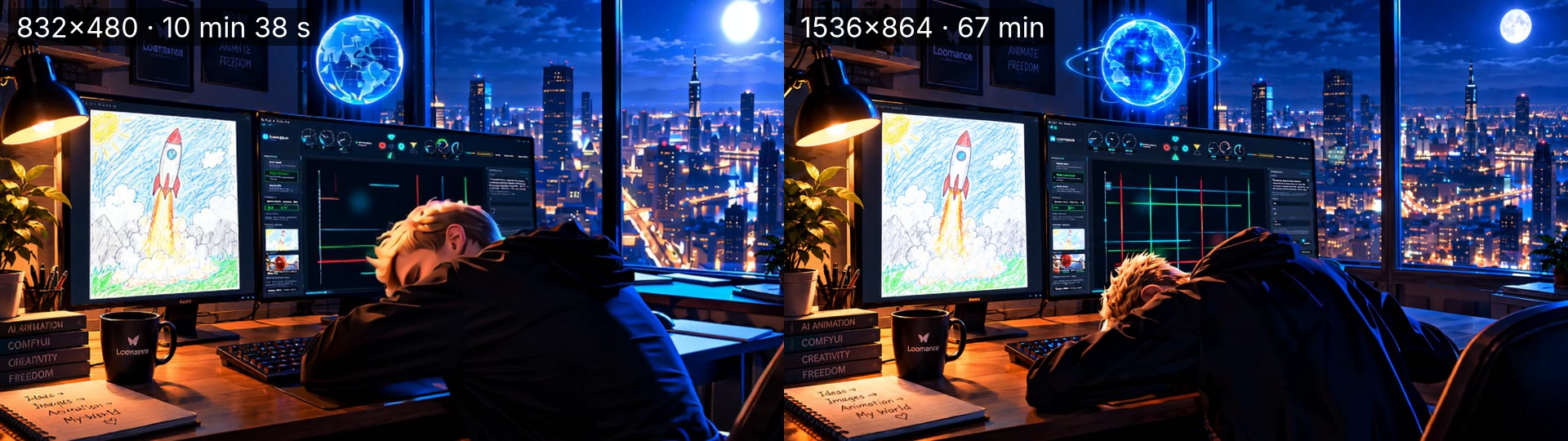
The overall scene and motion are similar. The difference is in small details:
- Text: at 1536×864, words on the mug, book spines and notebook are readable. At 832×480 they turn into garbled letters.
- Fine detail: the globe's rings, the grid on the monitor and the hair texture are sharper at high resolution.
- The drawing on screen (the rocket) looks good in both.
Upscaling doesn't recover detail the model never generated. If small text or faces matter, generate at a higher resolution.
Why a 14B model works on 12GB
It doesn't fit fully in VRAM, and it doesn't have to. Recent ComfyUI versions load model weights dynamically and offload the rest to system RAM. During the 1536×864 render, Windows Task Manager showed:
- 11.4 / 12GB dedicated GPU memory in use,
- 26.1GB shared GPU memory (model data held in system RAM),
- about 50GB of the 64GB system RAM in use,
- GPU at 99%, around 70 °C.
With 32GB of RAM, I'd expect this resolution to fail or slow to a crawl, since 26GB of overflow plus Windows leaves almost nothing. I haven't tested 32GB, so treat that as a warning, not a measurement.
Tips for 12GB cards
- Get 64GB of RAM if you want high resolution. On a 12GB card, RAM is what lets you go higher.
- Draft at 832×480. Check the motion and prompt in about 10 minutes, then run the final at high resolution overnight.
- Generate fewer frames and interpolate. 57 frames become a smooth 4.7 s clip at 24 FPS. Interpolation is much cheaper than generating every frame.
- Upscale at the end. Generate at the highest resolution you can afford, then upscale the finished video.
- You don't need a GGUF model. The fp8 model ran directly with offloading.
Update, October 2026: a follow-up test measured exactly how much VRAM and RAM these renders use, and what it means for 8GB cards: Wan 2.2 on an 8GB GPU? What real tests show about VRAM and RAM. In that test, limiting the same PC to 16GB of RAM did not slow down an 832×480 render, so high RAM use in Task Manager does not mean you need that much RAM. The 1536×864 render above was not repeated with less RAM.
How Loomance fits in
Getting this working by hand took a lot of trial and error with nodes, models and memory settings. Loomance is a free, ad-supported desktop app I built that installs ComfyUI and Wan 2.2 for you and runs these workflows with one click. Your images stay on your PC. If you'd rather wire nodes yourself, the official ComfyUI Wan 2.2 template is a good place to start. For a side-by-side of both approaches, see Loomance vs ComfyUI on WAN 2.2.
Tools and sources
- Wan 2.2, the open-source video model by Alibaba's Wan team (Apache 2.0 license)
- ComfyUI, the open-source engine Loomance runs on
- Loomance, the desktop app used for these renders (free, ad-supported)
Frequently asked questions
Try Wan 2.2 on your own GPU
Loomance is free to use (ad-supported) and renders locally on your NVIDIA GPU. No node graphs, no cloud uploads.
Download free